Wednesday, July 18, 2018

Download iOS 12 Beta 4 without developer account


Download iOS 12 Beta 4 without developer account
WHAT’S NEW IN IOS 12 BETA 4?


The Beta 4 update of iOS 12 doesn’t bring any new features, rather it fixes bugs and glitches present in the previous builds. Its build number is 16A5327f and weighs about 500MB.


According to its release notes, iOS 12 beta 4 resolves the following bugs and issues –


Fortnite crashing unexpectedly.


Netflix quitting while downloading a video.


Route map for a workout might be unavailable.


“No SIM” notification displayed in iPad when an Apple SIM is inserted without an active plan.


Screen data time may not sync properly across other devices.


Voice memos not syncing properly with iTunes.


Screen Time website usage of children not displaying on parents’ devices.


Apart from this iOS update, Apple also launched watchOS 5 Beta 4 and tvOS 12 Beta 4. You can download these updates from your Developer Center.


If you don’t have a paid developer account, you can simply use the OTA Profile or the IPSW files given below.
DOWNLOAD IOS 12 BETA 4
OTA PROFILE


Download
IPHONE


iPhone SE, iPhone 5s


iPhone 6s, iPhone 6


iPhone 6s Plus, iPhone 6 Plus


iPhone 8, iPhone 7


iPhone 8 Plus, iPhone 7 Plus


iPhone X
IPAD


iPad Air, iPad mini 2


iPad mini 4, iPad Air 2, iPad mini 3


iPad (5th generation), iPad (6th generation)


iPad Pro (9.7‑inch)


iPad Pro (12.9‑inch)


iPad Pro (10.5-inch), iPad Pro (12.9-inch) (2nd generation)
IPOD


iPod touch (6th generation)
SHOULD YOU UPDATE?


Yes, you should definitely update if you are affected by the aforementioned bugs. However, there’s no good reason as to why you should update if everything is running smoothly on your current version.


Moreover, early adopters have confirmed that the highly-anticipated Shortcuts app doesn’t ship with this version.


So, hold off before you upgrade to the latest version and wait till Apple officially releases the Shortcuts app.Jihosoft iPhone Backup Extractor Extract and recover all types of data from iPhone backup files, such as camera roll photos, videos, SMS, contacts, reminders, WhatsApp, and etc.

Gihosoft Free iPhone Data Recovery is a professional iPhone Data Recovery software to get back all your lost text message, photo, video, call history, note, contact and more from iPhone/iPad/iPod Touch.

Tuesday, July 17, 2018

How to Check Disk Space on Mac: Available and Used Space

How to Check Disk Space on Mac: Available and Used Space
Check Disk Space on Mac: MacBook Pro, MacBook Air, iMac Pro & All Macs

Step #1. Go to the Apple menu from the top right corner of the screen.


Step #2. Next, Under apple menu, Tap on About This Mac.

Step #3. there you can check presently installed OS X on your Mac in detailed. Like current version, Processor, Memory, Startup disk and Serial number.

Step #4. For check all about space on hard drive, Tap on Storage tab from the top.


If your Mac running more than one desktop OS with OS X, Then you can check free space individually in the separate partition. In below screen, you can see Macintosh HD running on macOS Mojave.

Also get where space used by your system likes apps, Media, Photos, Movies, Backups and Others. Also how many data space consume in MBs/ GBs.

If you ever lost or accidentally deleted data from your iOS device, you can use the professional Gihosoft iPhone Data Recovery software to retrieve important data from iPhone, iPad or iPod Touch even without backup.

Jihosoft iPhone Backup Extractor Extract and recover all types of data from iPhone backup files, such as camera roll photos, videos, SMS, contacts, reminders, WhatsApp, and etc.


Saturday, July 7, 2018

How to Enable Trackpad Mode in iOS 12 on iPhone 6, 6 Plus, SE, or iPhone 5s and iPad Running iOS 12


How to Enable Trackpad Mode in iOS 12 on iPhone 6, 6 Plus, SE, or iPhone 5s and iPad Running iOS 12


Step #1. Launch any app where you wish to use the trackpad.Related Articles:Gihosoft Android data recovery Free


I’m going to open Notes app to test this feature. Now, bring up the software keyboard just the way you normally do. Free iTunes/iPhone Backup Extractor for iPhone, iPad


Step #2. To enter trackpad mode, you need to tap and hold the Spacebar key.


Once you have activated this mode, you can start the experiment.
Use Trackpad Mode On iPhone SE or Earlier and iPad Running iOS 12


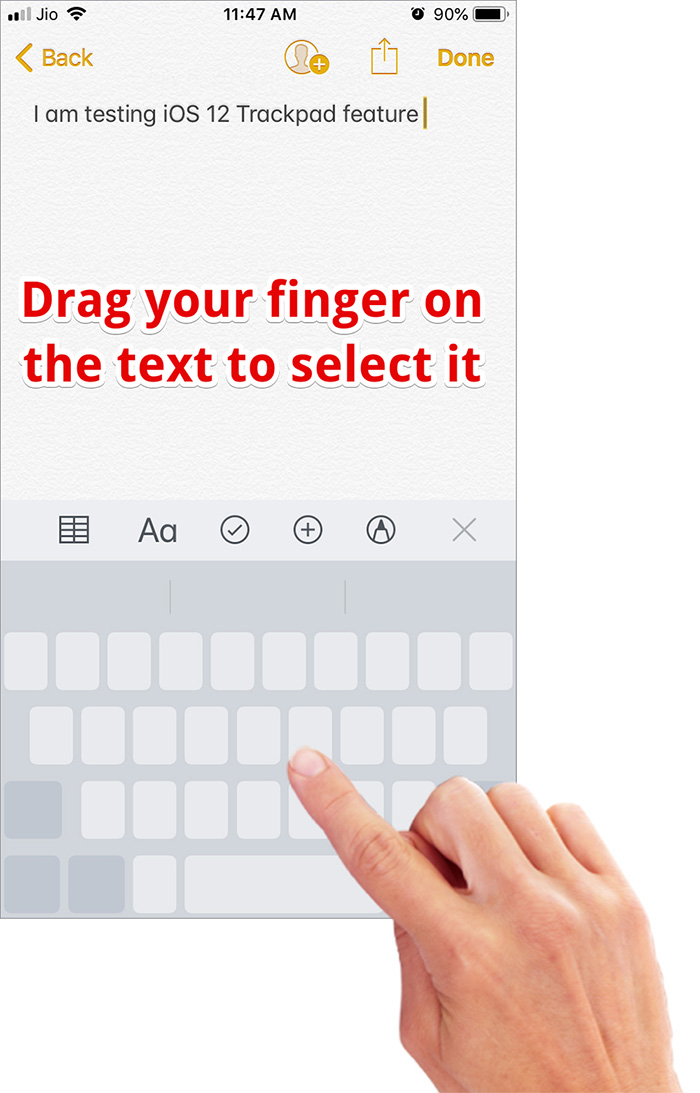
To enter text selection mode, simply tap on any greyed-out area while still pressing the Spacebar key. Then, you need to drag your finger on the text to select it. (On your 3D Touch compatible iPhone, you can press the screen to select text.)


Sponsored Links


Once the text has been selected, you can go ahead and edit it as usual. Yes, you don’t need to keep holding the space key to do that.


You can tap on the selection to access the multiple formatting options such as Cut, Copy, Paste, Share Look Up etc.


That’s done!


Now that you have put your hands on this neat feature take the full advantage of it to edit text with ease.


Your take?


This new improvement has made the software keyboard more user-friendly. Have any feedback or question? Feel free to shoot it up in the comments.

Saturday, June 16, 2018

Here are over 150 new features and changes in iOS 12 for iPhone and iPad


A


+
Video
Here are over 150 new features and changes in iOS 12 for iPhone and iPad


When Apple introduced iOS 12 during the WWDC 2018 keynote, they barely scratched the surface on what was changed in their latest major update. We've tracked down well over 150 features to find everything new in iOS 12 for iPhone and iPad.


The biggest feature for iOS 12 for most users will likely be the huge increase in performance on older devices. We tested this ourselves on a variety of devices, and saw a substantial increase in speed in many aspects —but not all, and not on all devices.


Other huge features include the focus on "digital health" and a new set of tools cumulatively known as Screen Time. We saw some big enhancements to some oft-overlooked stock apps such as Stocks, Weather, News, and Voice Memos. Apple also launched Measure, an ARKit app to measure objects in 3D space.


On the iPad, iOS 12 adds iPhone X-inspired gestures, grouping of notifications, support for third-party maps like Waze or Google Maps in CarPlay, new tricks for Siri with Shortcuts, Group FaceTime, and we saw ourselves in the new MeMoji.

Changes outlined in the video include:


Stock apps


  • New app: Measure


  • Leveler removed from Compass app


  • Redesigned Voice Memos


  • New voice memos Icon


  • Voice Memos for iPad


  • Redesigned Stocks app


  • Stocks has Apple news integration


  • New iPad Stocks app


  • Redesigned News app


  • iBooks has been renamed Apple Books


  • Updated Apple Books settings preferences


  • Weather app air quality settings preferences


  • Weather app now tracks air quality


  • Weather app now tracks the air quality index

App Store


  • Category placement removed


  • Numerical rating given


  • Copyright info moved up

Settings


  • New iOS 12 wallpaper


  • Top two rows of default wallpapers have been swapped


  • Supports two faces for Face ID


  • Enhanced battery statistics


  • Persistent battery usage information


  • Automatic system software updates


  • Do Not Disturb bedtime option


  • Sounds and Haptics preferences moved locations


  • Control Center preferences moved location


  • New Stocks preferences


  • New Voice Memos preferences


  • New option to auto delete Voice Memos after a period of time


  • Audio quality option for Voice Memos


  • Can change default recording name for Voice Memos


  • New Measure preferences section


  • iTunes U settings added


  • No more System Services Location icon


  • Updated Passwords and Accounts preferences


  • Able to disable access to Wallet on Lock Screen


  • Able to disable USB accessories on Lock Screen


  • Accessibility setting to always allow USB devices under switches


  • Siri Female is default Speech voice instead of Samantha


  • Siri Suggestions on Lock Screen


  • Emergency SOS call with side button is default, slider removed


  • Maps have background app refresh toggle


  • Samoa and Mexico added to regulatory info


  • Thicker sliders

Notifications


  • Grouped notifications


  • Instant tuning for notifications


  • Bedtime notifications


  • Deliver notifications quietly


  • Updated Notification Center


  • Updated Notifications preferences UI

CarPlay


  • CarPlay supports third-party navigation apps such as Waze and Google Maps


  • Improved performance with smoother animations

Siri


  • "Hey Siri" works with Low Power Mode


  • Play music intent for third party music apps


  • Siri Irish male accent


  • Siri Irish female accent


  • Siri South African male accent


  • Siri South African female accent


  • Ask Siri to show your passwords


  • Find My iPhone intents for Siri


  • Add Shortcuts to Siri


  • Siri flashlight controls


  • Workflow app works with Siri Shortcuts


  • Enhanced Spotlight Siri suggestions


  • Shortcuts app


  • Answer questions about famous people


  • Answer questions about food


  • Answer questions about motorsports


  • Can search memories in Photos

Safari


  • Favicons in Safari tabs


  • Enhanced fingerprinting prevention against advertisers

Messages


  • New Animoji interface


  • Animoji tongue detection


  • Animoji wink detection


  • Animoji tiger


  • Animoji koala


  • Animoji T-Rex


  • Animoji ghost


  • MeMoji


  • MeMoji Maker


  • Longer Animoji (30 secs)


  • Messages app for the Camera


  • Photos iMessage app


  • Messages app for Camera effects


  • Messages app for Animoji


  • Messages app for filters


  • Messages app for text effects


  • Messages app for shapes


  • New design for App Strip


  • When making iMessage app full screen, app name is at the top


  • Quick Messages app contact shortcuts

Photos


  • New Photos Search and For You app tabs


  • New Photos app Album media types


  • New Photos app Search


  • New Photos app For You


  • Updated import interface


  • Swipe left to right to go through album instead of vertically

Screen Time


  • Screen Time


  • Screen Time - Downtime section


  • Screen Time - App Limits section


  • Screen Time - Always Allow section


  • Screen Time - Restrictions section


  • Screen Time - for kids section

FaceTime


  • New FaceTime interface


  • Group FaceTime


  • Group FaceTime Messages


  • Add effects, Animoji, shapes, text filters during a FaceTime call

Music


  • Search for Music with lyrics


  • Dark now playing widget on Lock screen


  • Apple Music Featured Radio Stations


  • Updated Apple Music artist pages

Home


  • New home settings icon in Home app instead of arrow


  • New notifications section for Home app


  • Says Settings instead of details for accessories


  • HomePod personal requests preferences moved


  • Remote control support

iPad


  • Redesigned status bar


  • Date in iPad Status Bar


  • One finger swipe up to go to home


  • Control Center removed from App Switcher


  • Access Control Center from top right corner


  • Access App Switcher with one finger


  • Updated Screen Recording UI for iPad


  • Trackpad mode using space bar


  • Import and manage RAW photos on your iPhone and iPad and edit on your iPad Pro

System


  • Swipe up to kill apps


  • QR 3D Touch on Camera app


  • Scan documents 3D Touch on Notes apps


  • Faster performance


  • Updated QuickType keyboard UI


  • Control Center Scan QR Code shortcut


  • QR Code 3D Touch shortcut on camera icon in CC


  • QR Codes now highlighted in frame


  • English thesaurus


  • New dictionaries


  • New Spotlight Suggestions (open links)


  • Scrollable Reachability


  • Notifications in Reachability


  • New chevron on top of Reachability


  • Extended email preview on notifications


  • Dictation works with third-party keyboards


  • More Markup color options


  • Change markup thickness and opacity


  • Security code autofill


  • New Strong Password' verbiage


  • Password reuse auditing


  • New password API


  • One-Time Password Autofill


  • AirDrop saved passwords


  • Podcast app custom skip settings


  • Remote control skip support for Podcasts


  • Rescan failed Face ID


  • Screenshot prevention


  • Live Listen Control Center Hearing shortcut


  • New Control Center brightness control animation


  • Screen Time widget


  • Disable Apple Pay notifications per card in wallet


  • Student ID in wallet


  • New awards tab in Activity app

Be on the lookout for iOS 12 to launch this fall alongside tvOS 12, macOS Mojave, and watchOS 5.
Gihosoft iPhone Data Recovery is a professional iPhone Data Recovery software to get back all your lost text message, photo, video, call history, note, contact and more from iPhone/iPad/iPod Touch. It offers a full solution to recover your lost data in different tough situations. Besides recovering data directly from iPhone, iPad and iPod touch, it also allows you to recover data from iCloud and iTunes backup files.

Backup WhatsApp Messages to Gmail

Backup WhatsApp Messages to Gmail you can never have too many backups for your WhatsApp messages and while you may be able to back up the ch...